
Drafts and posted comments
- A draft autosaves as you write and is private to you. Nobody else can see it.
- A posted comment is visible to people who can review that website or file, unless your team marked it Only my team can see this.
Finish up
- When you’re done, choose Comments on the review toolbar, then Finish review at the foot of the list. Once you have something to send, Finish review is also on the toolbar on a computer, and floats above the website on a phone. It opens a confirmation before anything is sent.
- Check the list. It shows each comment that’s about to go to your team, including your drafts.
- Choose Notify team to send the summary. If you have finished drafts to post, the button shows how many it will post. Choose Keep reviewing to go back.
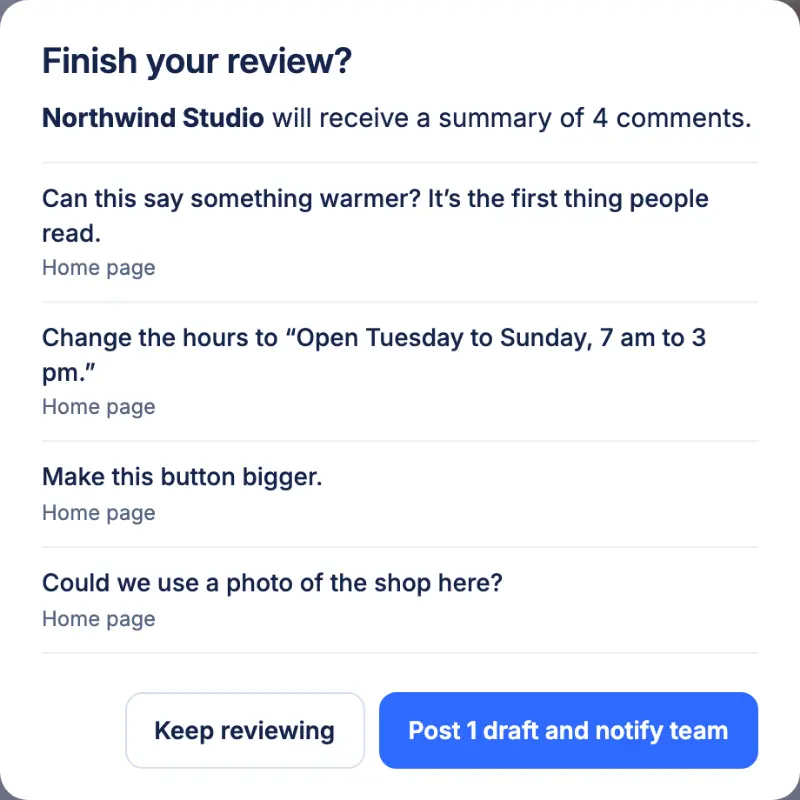
A draft with nothing in it stays out of the list. The sheet tells you when a draft isn’t ready to send. If a comment can’t be sent, it says which one, and Try again sends the rest. Nothing is lost.
Who gets told
Posting a comment sends no email by itself. Your team gets one summary when you finish. If you leave without finishing, the summary goes after 60 minutes with no new comment, and says you may not be done.
After you finish
Finishing doesn’t approve the project or publish anything. You can keep reviewing and add more at any time, or come back through a valid link to follow the conversation.