
Send an invitation
- In the review, choose Share in the review toolbar. You can also share a website or file from its ... menu on Home, or share a whole project from Projects in the sidebar.
- Under Invite by email, type your client’s address. Separate several addresses with commas.
- Optionally choose Include a personal message.
- Choose Send.
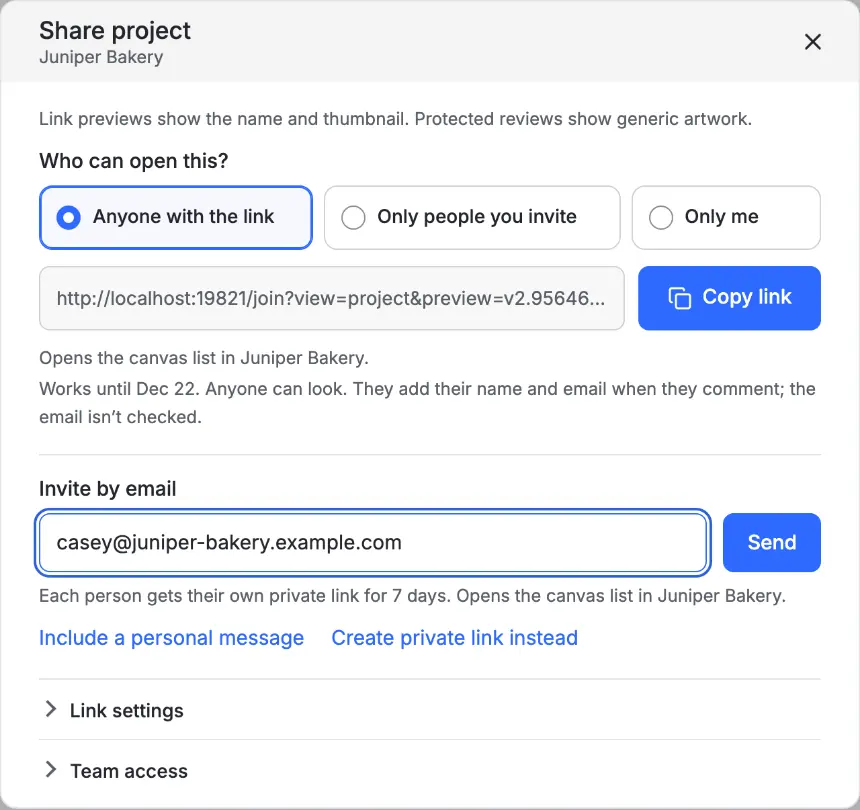
Each person gets their own private link, which works for 7 days. Sharing a canvas gives a new guest access to that website or file alone. Sharing a project includes its own website and file canvases. Your client opens the link with no account or installation.
If your installation can’t send email
Share says so and the button becomes Create private link. Copy that link and send it yourself, one per person.
Share one link with several people
Under Who can open this?, choose Anyone with the link. The link appears right away, so choose Copy link and send it. It opens straight away, and people add their name and email when they leave feedback. See Review links.
Check it went out
Everyone you invited is listed in Share, with whether their email is on its way, sent, or failed. You can send it again or remove them there too.