
Clear feedback.
Confident changes.
From “this bit here” to a change everyone can review. Give your client a place to point, and your coding agent the context to act.
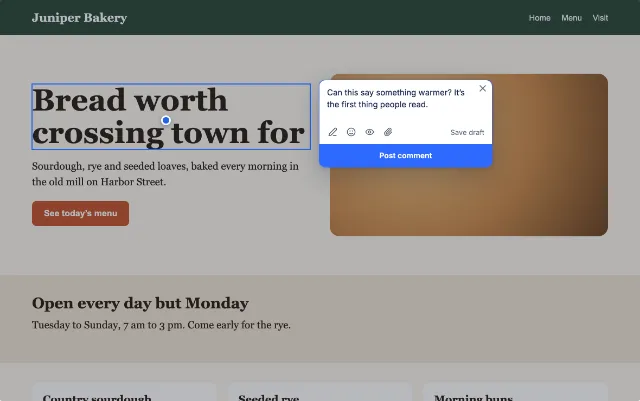
“Let’s make this heading feel more welcoming.”
Screenshot saved with requestLess interpretation.
More useful context.
Clients focus on the work. Your team gets clear requests with the right context.

- Client reviewThe right context
Open the canvas. Find the detail.
Share a website, image, PDF, video or email canvas. The reviewer opens the link and finds the page, image or video moment that needs attention.
- Clear requestsEvidence + intent
Show what should change.
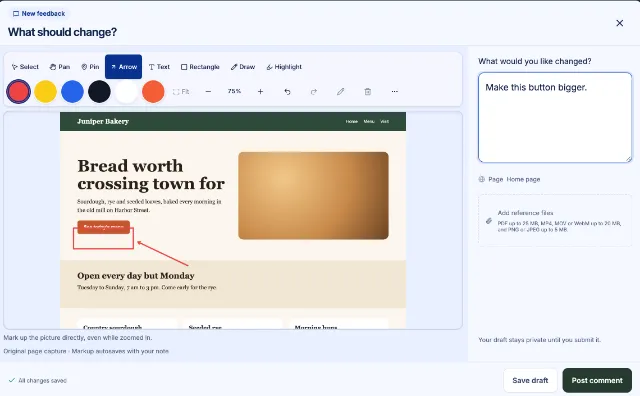
Pin a comment, draw on a screenshot or attach a reference. Post the comment when it is ready, or save a private draft and use Finish review to submit it later.
- Authorized implementationA reviewable change
Make the edit with your team or agent.
Designers, editors and developers can work from the same feedback. For code changes, connect an AI assistant to approved projects and authorize it separately in the matching repository. You can also export the feedback package.
- Human reviewYour decision
Check the result. Decide what’s next.
The coding agent reports what changed and which checks it ran. Your team and client inspect the result, then resolve or reopen the request. Publishing the website remains a separate approval.
Good requests travel
with their context.
Page address. Original screenshot. Markup. Notes and references. Keep the evidence together so the next person—or agent—can understand the same request.
Explore AI handoffAgentic Edit does not start coding agents, acquire repository access, or publish your website.
Does the client need a coding tool?
No. The client opens the review link, browses the website, and requests changes. The agency handles the coding client and repository permissions.
Does submitting feedback automatically change my website?
Submitting feedback shares the request with the project. A separately authorized coding agent or developer implements it in the matching source repository. Agentic Edit does not launch the agent or publish the change.
What does an implementation report prove?
It records what the coding client reports: the change, validation, and any branch, commit, or preview details it supplies. Agentic Edit does not independently certify those tests. Your team reviews the evidence and the result.
Make the next edit clearer
One place for the request. A shared understanding of what comes next.